
Showing posts with label A/B Testing. Show all posts

Thursday, November 15, 2012

Content Positioning: Preventative or Pain Relief?

Did you know the average American spends almost twice as much on pain remedies than on vitamins each year? It's even higher when you factor in prescription pain remedies.

Now remember, I said the "average American". I know you health nuts are cringing right now.

But it makes sense. I know I am more focused on alleviating any current pain than on preventing future pain. And I would consider myself health-conscious.

For example, I am far more likely to reach for an Advil if I have a headache, than to reach for a vitamin if I do not have a headache.

So if this is true for people on a personal level, might they carry this preference with them when making business purchases?

Which is the truer statement at your company?

"Of course we don't look busy. We put the right systems and processes in place the first time". (Preventative)

"Of course we're busy. We have to manage all the incompatible systems that keep breaking". (Pain Relief).

In our experience as consultants, we hear the 2nd statement far more often that the first.

So if your conversions are getting stagnant, try positioning your content more on how your product or service alleviates existing pain and less on how your product or service prevents future pain. See if you don't get a higher conversion. As an added bonus when focusing on alleviating pain, you also get the added advantage of urgency that you don't get otherwise.

BTW: The average American purchases only 1 bottle of vitamins a year. Just sayin...


Eloqua Certified Marketing Automation Best Practices Consultant, Astadia


Let’s connect on Linkedin 
Let’s Connect on The Front Porch 
Let’s connect on Facebook 
Let’s connect on Google+


Sources: Consumer Health Products Association, http://weighttraining.com, http://reportllnker.com

Sunday, April 3, 2011

How Many Invitation Emails Does it Take to Get a Webinar Registration?

To help answer this question, we (Astadia) recently had a chance to reconfirm initial tests we performed several years ago, but with some interesting new results.

We wanted to know:
  • How many webinar invitations do people ignore before finally signing up?
  • How many webinar invitations will people tolerate receiving before unsubscribing?
  • How long or how soon before the webinar do invitation(s) work best in generating registration signups?
Here are the results:
  • 2 weeks out = 21 submissions – Subject Line: Register Today
  • 1 week out = 55 submissions - Subject Line: There’s Still Time to Register
  • 3 days out = 34 submissions-- Subject Line: Last Chance to Register
  • 1 day out = 37 submissions -- Subject Line: You Have 24 Hours Left to Register
  • Day of Webinar = 46 submissions -- Subject Line: You Have 30 Minutes Left to Register
Key Takeaways:
  • 19% of registrants waited until the day before the webinar to register
  • 24% of registrants waited until the day of the webinar to register
  • 43% in total waited to within 24 hours of the webinar to register
  • Adding urgency to the Subject Line increases conversion
  • There was no spike in unsubscribes whatsoever throughout the entire invitation process. In fact the unsubscribe rate remained below industry averages.
While these results only reflect what worked best for this particular client, I'd love to hear what metrics you have captured and what timing is working best for you.

NOTE: We were unable to test invitations sent further than 2 weeks out as the webinar content didn't get finalized until then.

Visit my brand new website and learn more about content marketing.

Steve Kellogg
-Demand Generation/Marketing Automation Consultant, Astadia
-Eloqua Certified Marketing Best Practices Consultant

Please share this:


Share 

Sunday, June 27, 2010

An Easy Way to Increase CTR by 55%?


An interesting SMB study recently released from GetResponse revealed up to a 55% increase in promotional email CTR if social media links were also present in the email.

In fact the more social media links you include, the higher the click through rate increases, according to the study.

3 social media icons or more: 11.20% average CTR

2 icons: 9.30% average CTR

1 icon: 8.7% average CTR

No icons: 7.20% average CTR

So going from no social media link icons (7.2% CTR) to adding 3 social media icon links (11.20% CTR) actually increases average click thru rates by 55%, again according to the study.

The study also found that when adding just one social media link:

Twitter offered the highest CTR: 10.2%

Facebook: 9.1%

MySpace: 8.7%

LinkedIn: 7.20%

Digg: 5.30%

(Hmmm...the fact that LinkedIn was so low tells me this study was likely from SMB B2C companies)

Also what the study didn’t mention was whether or not the increase in CTR was actually caused by recipients clicking the social media links themselves, thereby causing the uplift in CTR.

Either way, it seems to be a likely candidate to do some quick A/B testing yourself, especially since marketing automation vendors such as Eloqua provides such a easy way to add these icons to your emails.

I’d love to hear any metrics from any testing you do or have already done in this area.

Updated 5-8-12
Visit my brand new website and learn more about Social Media Marketing

Steve Kellogg

-Demand Generation/Marketing Automation Consultant, Astadia
-Eloqua Certified Marketing Best Practices Consultant

-Join me on: Linkedin | Twitter | Facebook

Photo from ymedialabs.com

Thursday, April 30, 2009

Email A/B Test Adds $6m to Funding Pipeline!

I wanted to share the astonishing results of an A/B test we recently created for one of our financial clients.

Results:

Email A: $0 added to their funding pipeline
Email B: $6m added to their funding pipeline

Guess what – the two emails were exactly the same, except for one small shift.

Here are the 2 emails:

Email A: $0 add to funding pipeline


Email B: $6m added to funding pipeline

"Hi Steve,

I wanted to make sure you received my email below. As I am sure you are aware, in today’s financial market it is more important than ever to ensure your company's liquidity and increased borrowing resources.

Let me know a good time to reach you to discuss how we can become a competitive financial resource for your company."

(Note: The actual copy was slightly different, again for confidentiality, but you get the idea).

Sincerely,

Bob Smith
Financial Consultant
Company XYZ
(555) 123-4567
bsmith@xyz.com

Clearly adding a personalized message from the sales rep above the same email generated a much, much better response!

BTW: This was a marketing-driven email, which dynamically plugged in the appropriate sales rep's email address in the FROM field, as well as inserted the sales rep's signature in the email (thanks to Eloqua). The sales reps never actually sent these.

Takeaways

  • Even though there was a "CONTACT US" link in the body of the email offer, most of the responses actually came from customers either REPLYING to the email itself
    (which sent an email directly to the sales rep) or just calling the sales rep directly, using the phone number which appeared in their signature. Needless to say, the sales reps LOVED this!

  • We added "FWD:" in the Subject Line of Email B to further the appearance that the email was actually being sent from the sales rep.
Final Thoughts

This is definitely something you should test yourself. But be cautious in overusing the "FWD:" in the subject line. I have seen many blatant fakes using this technique. It is very easy to spot those emails that simply add "FWD:" to the subject line. But if you do it correctly, as in this case the results can be astonishing.

Another example of the power of simple A/B testing!

And another great example of how marketing automation benefits sales!

Steve Kellogg
-Demand Generation/Marketing Automation Consultant, Astadia
-Eloqua Certified Marketing Best Practices Consultant

On Twitter? Tweet this Post

Tuesday, March 17, 2009

The Trouble with Testing

“Yea, yea, yea, I know I should be testing. I just don’t have time. It’s hard enough getting one email out the door let alone creating different versions for testing! Give me more time or more resources, then I’ll do testing!”

Sound familiar? [Big Sigh].

I won’t waste your time telling you why you should be testing. You already know that. But testing isn’t something you should be doing – it is something you MUST be doing. Why?

It Makes You Look Really Good
Showing your boss that you personally generated a measurable increase in open rate, CTR or conversion rate as a direct result of testing makes you look really good.

It Makes You Feel Really Good
Imagine the thrill of seeing a significant lift in response after testing one of your brilliant hunches. Not to mention the look on your boss’s face when you show him/her your results.

It Makes You Be Really Good
Testing is the only 100% accurate metric you have in benchmarking the growth of your marketing effectiveness.

So with all this going for it, there must be some pain associated with testing, since, according to one report, less than 10% of us actually build it into the routine.

So let’s examine the main reasons why we don’t test and identify some solutions:

"I Don't Have Time"
You don’t need much time. One of the best criteria to test is the Subject Line. For Pete’s sake, how long can it take to come up with 2 of them and test each one?

"I'm Not Sure What to Test"
Here’s your list:


  1. Who the email is FROM (company vs. sales rep for example)

  2. Subject Line

  3. CTA (Call to Action – Urgency/Scarcity)

  4. Copy (“What’s in it for me”)

  5. Graphics links vs. text links

  6. Layout/design

  7. Which day of the week

  8. Time of Day

  9. Frequency

"I'm Not Sure How to Test"
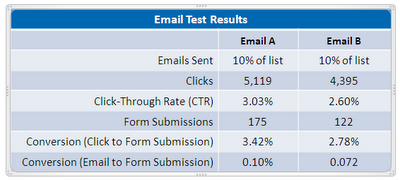
The quickest way to get up to speed is a simple 10/10/80 split test. Send 10% of your list Offer A, then send another 10% of your list Offer B. whichever offer wins, send that to the remaining 80% of your list.

TESTING BEST PRACTICES

  1. Test only one element at a time. Start with #1 above and don’t test anything else until this metric settles down. At some point this test will start to deliver diminishing returns. At that point, stop and go with your most successful version. If the metric starts to fall off, resume testing that element until it picks back up again.

  2. Don’t test something just because you can. Stick to the list above, go in order.

  3. Document the results of every test. Make sure to include what you tested and the results.

  4. Be consistent. Build the process of testing into your workflow as a permanent action item.

SUMMARY
While some companies have already implemented complex multi-variant testing, there are others still cringing at the thought of doing any testing at all. So when someone says they need an email sent out tomorrow, push back. Tell them you need 48 hours to test. It’s not your fault the requestor is so unorganized they can only give you 1 day’s notice! Why should your testing process suffer?

What’s funny is that many of us (including me) at one time or another have purchased Industry Benchmark Reports, downloaded white papers and attended webinars looking for “industry averages” to learn what works and what doesn’t work as a way of circumventing the testing process. Alas, while these are all great at pointing you in the right direction, most of these include the following caveat:

“Results may vary but are worth testing”

‘Nuff said.

Steve Kellogg
aDemand Generation/Marketing Automation Consultant, Astadia
aEloqua Certified Marketing Best Practices Consultant

On Twitter? Tweet this Post